You can set up online ordering for a Singapore stall, coffee shop or café in a few working days. Put your menu with prices online, give each table or counter a QR code, and let customers pay by PayNow straight into your bank account. This guide walks each step, with the Singapore rules to check.
- Start with your menu: clear names, prices on everything, a few good photos, and Chinese plus English if your customers read both.
- Choose one system for ordering, payment and kitchen display, so staff never retype orders between devices.
- Take PayNow into your own bank account. Staff confirm each payment with one tap — a person checks every payment — and StallPOS takes no commission.
- Treat personal data properly under the PDPA, keep food hygiene in view, and test with staff and regulars first.
On this page
- What online ordering means for a food stall
- Step 1: Get your menu ready first
- Step 2: Choose a system that does the whole job
- Step 3: Set up payments the Singapore way
- Step 4: Build the menu and the QR codes
- Step 5: Keep prices and availability accurate
- Step 6: Check the Singapore rules before you launch
- Step 7: Run a soft launch
- What it costs
- Boss questions
- Related guides
- Sources
- Where StallPOS fits
What online ordering means for a food stall
The phrase covers three things; most owners need only the first two.
- Dine-in QR ordering. The customer scans a code on the table, orders and pays; the paid order appears straight on the kitchen display, and nobody walks a slip back and forth.
- Takeaway QR ordering. The customer scans a code at the counter or in the queue, orders, pays, and collects when called.
- Delivery through your own website. Useful for restaurants with riders; many hawker stalls skip it.
A QR code is just a door. What matters is behind it: a menu you can edit, a payment customers already use, and a kitchen that sees the orders.
Step 1: Get your menu ready first
The menu decides whether customers order smoothly, so prepare it before touching software.
- Write every item once, clearly, using the name customers say out loud.
- Put prices on every item and add-on. List extras such as an egg or extra noodles as options on the dish, not separate lines.
- Add a few good photos, starting with your signature dishes. Three good photos beat thirty poor ones.
- Go bilingual if your regulars read Chinese and the office crowd reads English. StallPOS supports English and Chinese menus.
- Mark what can sell out, so you can switch items off when stock runs out.
A short hawker menu takes an afternoon to prepare; a café with several categories and set meals should allow a day or two.
Step 2: Choose a system that does the whole job
A good system for a Singapore food business should do five things:
| A good system gives you | Why it matters |
|---|---|
| A QR menu with prices and options | Customers order without waiting for staff |
| PayNow to your own bank account | No commission skimmed; the money lands in your account |
| A kitchen display | The paid order reaches the cooks without shouting over the wok |
| A cashier point-of-sale | Walk-in customers can still order and pay at the counter |
| Daily sales reporting | Check the day's takings — cash versus PayNow — at closing |
Two checks save grief. Ordering and the cashier should be connected, or someone merges two records at day end. And check the hardware: some systems tie you to proprietary terminals; StallPOS runs on your own Android phone or tablet. To compare the market, see our hawker and coffee-shop POS comparison and guide to choosing a hawker stall POS.
Step 3: Set up payments the Singapore way
Customers in Singapore expect to pay by PayNow. Your first decision is where the money goes.
With direct PayNow, the payment goes into your business bank account — no middleman holds the funds — and StallPOS takes no commission on PayNow (illustrative: at a hawker's typical bowl price, that difference compounds over a month). Your bank's receiving fees, if any, are between you and your bank; check your bank's fee schedule. Our page on PayNow QR ordering for hawker stalls explains the flow.
Know how a payment becomes a kitchen order. With StallPOS, the customer pays by PayNow, staff confirm the payment with one tap in the app, a voice announcement follows, and the order then appears on the kitchen display. A person verifies every payment, so a missing one is caught before the cooks start.
SGQR was created so that several e-payment solutions can be combined in one QR code, led by a taskforce co-led by MAS and IMDA. If you already display an SGQR sticker, keep it for walk-up payments.
Before setup: your bank details and UEN, a stable internet connection, and a kitchen screen — a cheap tablet on a stand is enough. Mobile data from a spare phone works as a backup for the first few days of testing.
S$58/month per stall · setup free · first 30 days of live ordering at S$0 from Go-Live · no commission on PayNow.
Step 4: Build the menu and the QR codes
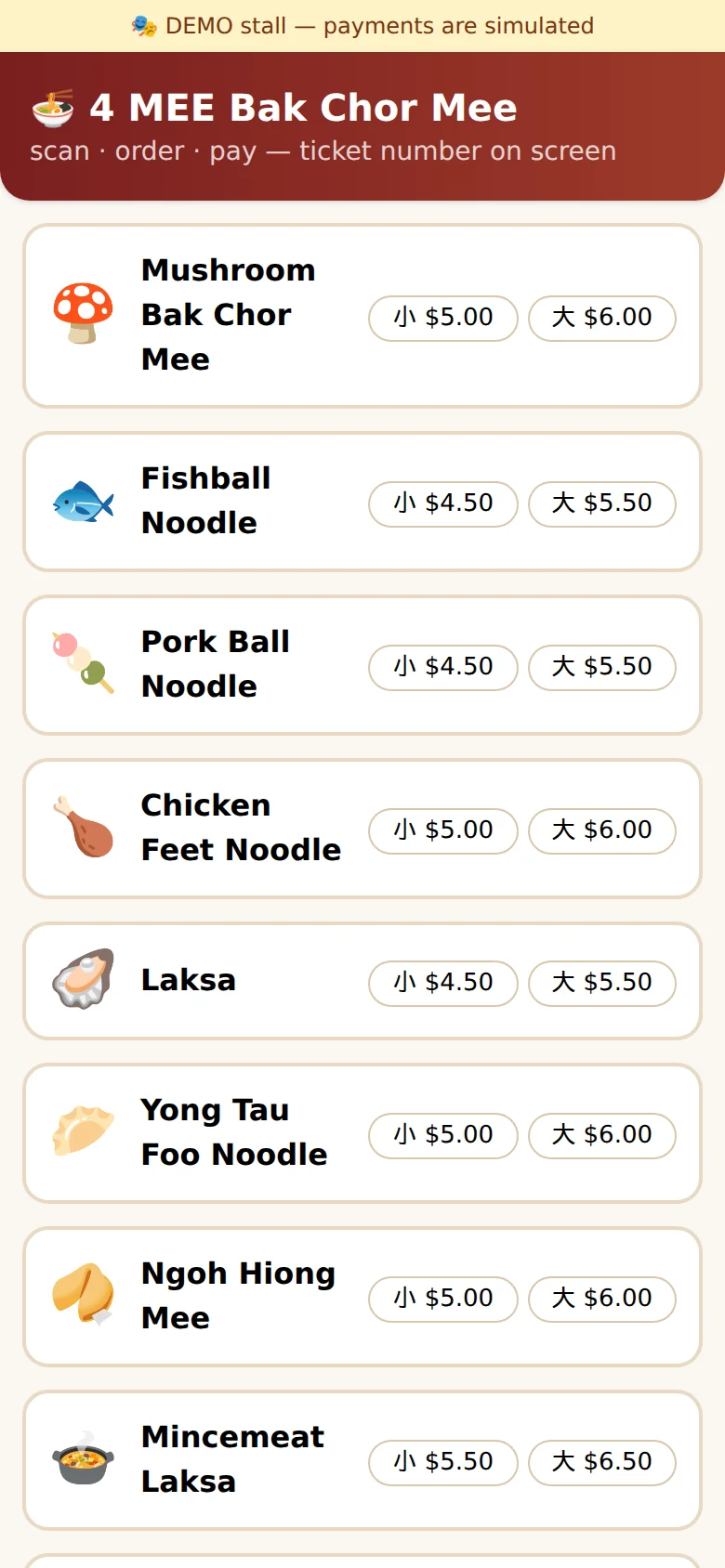
We set up each shop individually — categories, prices, options, languages, table numbers — instead of handing you an empty dashboard. Setup is free.
Dine-in self-service ordering
Give each table its own code, so orders arrive labelled with the table number:
- The customer scans the code with their phone camera. No app needed.
- They browse, choose options and see the total.
- They pay by PayNow, or you can set the order to be paid at the counter.
- Staff confirm the payment in the app (Step 3 explains this bit), the order appears on the kitchen display with the table number, and staff or the customer collects — whichever way your shop runs.
For coffee shops where stalls share tables, see our QR ordering for coffee shops and canteens page.
Takeaway QR ordering
Takeaway is different: there is no table to deliver to. Decide:
- Where the code lives — a queue poster, a counter sticker, or your social profile.
- How you call orders — a running number on a screen works well; make sure the customer sees their number after paying.
- Pickup times. At lunch peak, show an honest waiting time.
- Packaging. Food licensees must make sure food is not packed in paper that carries writing or printing that can touch the food. Keep printed material away from the food.
A queue code also shortens the line: customers order while waiting, and the cooks start earlier.
Step 5: Keep prices and availability accurate
A wrong menu loses trust faster than a slow one. Edit a price or item in the dashboard and guests see the update straight away, with no reprinting — the QR code stays the same while the menu behind it changes.
Good habits: switch items to sold out the moment the last portion goes; review prices monthly and after supplier increases; update photos when a recipe or presentation changes; check the menu on your own phone weekly.
Step 6: Check the Singapore rules before you launch
Online ordering does not remove your existing obligations. Three areas deserve a quick check.
Food hygiene. The Environmental Public Health (Food Hygiene) Regulations apply however the order arrives, and they require that every person engaged in the sale or preparation of food completes a food hygiene course as required by the Director-General. Check that your staff are covered before opening to more orders.
Customer data. If your ordering page asks for a name, phone number or email, you are collecting personal data. Under the PDPA, businesses must obtain consent and tell customers the purpose for collecting, using or disclosing it. Collect only what you need — a table number needs no personal details at all.
Your software vendor. You remain accountable for personal data an IT vendor handles for you, and vendor responsibilities should be spelled out in the contract. Ask any vendor, in writing, how it protects customer data.
Step 7: Run a soft launch
Do not switch everything over on a Saturday lunch. A gentler plan:
- Day 1 to 2: staff test. Order from a phone on mobile data and Wi-Fi, pay a small real PayNow amount and check the bank.
- Day 3 to 4: regulars. Invite a few familiar customers at a quiet hour and watch where they hesitate.
- Week 2: one channel. Turn on dine-in or takeaway first, not both.
- Then expand to every table or the queue.
Watch in week one: are any items missing options, such as spice level or no-vegetable requests? Does a paid order reach the kitchen display at once? Would a three-step sign beside the code help those who hesitate? Do the daily sales figures match your cash and bank records at day end?
We run StallPOS daily at our own noodle stall, so these checks come from real lunch queues.
What it costs
StallPOS costs S$58 per month per stall, month-to-month, with no setup fee — a person builds your first menu with you. You get 30 days of live ordering for S$0 when you activate Go-Live, to test with real orders before you pay. See the pricing page for what is included.
Boss questions
No. The customer scans the QR code with their phone camera and orders in the browser — quick for people queuing at lunch.
Yes. Every item, option and add-on carries a price, edited in the dashboard. Customers see updates straight away; the printed QR code stays the same.
No proprietary hardware. Use your own Android phone or tablet for the kitchen display or cashier, a stable internet connection, and your bank details for PayNow.
The customer pays by PayNow into your bank account, and the paid order reaches the kitchen display — Step 3 has the full flow.
Not on PayNow through StallPOS. The money goes straight into your business bank account; your bank's receiving fees, if any, are separate. You pay the monthly plan of S$58 per stall.
Yes. Dine-in codes are set per table; takeaway codes can sit at the counter, in the queue or on social pages. Start with one channel, then add the other.
Related guides
- PayNow QR ordering for hawker stalls — costs and flow
- Choosing a POS for a Singapore hawker stall
- Hawker and coffee-shop POS, compared honestly
Sources
- Fact sheet on Singapore Quick Response Code (SGQR), IMDA
- Environmental Public Health (Food Hygiene) Regulations, Singapore Statutes Online
- Your Personal Data, Your Choice, PDPC
- Safeguard your organisation with accountable data protection practices, PDPC DPO Connect
Where StallPOS fits
StallPOS keeps it simple: QR ordering, cashier, kitchen display and daily sales reporting on one plan at S$58 per month per stall, with free setup and a 30-day live-ordering trial at S$0.
Our advice is the same wherever you buy: start small. Put a short menu online, run it for a week with staff and regulars, and add the rest once the basics feel easy. Card / credit-card terminal payments are not part of StallPOS today (PayNow QR is the payment method).