A restaurant tech stack is the set of software and devices that run your ordering, payments, kitchen and reporting. For a small Singapore food business, the sensible stack is short: one POS at the centre, QR ordering feeding it, a kitchen display behind it, and PayNow for payment. Everything else — accounting, stock systems, reservations — waits until those four are working.
- The stack is POS, QR ordering, kitchen display, PayNow. Add the rest only when those four are running smoothly.
- What matters is whether the parts share data — one menu change should reach the counter, the QR menu and the kitchen without anyone retyping it.
- PayNow goes straight into your own bank account — the customer pays, your staff confirm the payment in the app, and only then does the order reach the kitchen.
- Reporting you can act on is daily: takings, cash versus confirmed PayNow, and the day's order records, exportable as CSV.
- Card terminals, stock systems and reservations tools exist — they are separate purchases, not part of every POS.
On this page
- What a stack actually is
- Ordering: one menu, every channel
- Payment: the shortest chain that works
- Kitchen: a screen instead of shouting
- Reporting: what to expect on day one
- Choosing a POS: the checklist that saves you money
- The first-year cost framework
- Five demo tests before you sign
- Five common mistakes
- Stacks by stage
- Where StallPOS fits
- Boss questions
- Related guides
- Sources
What a stack actually is
Think of the stack in layers. Each layer does one job, and the connection between layers is what saves you time.
| Layer | What it does | Do you need it on day one? |
|---|---|---|
| Ordering | QR menu, counter ordering | Yes |
| POS and cashier | Holds the menu, takes orders, records every sale | Yes |
| Payment | PayNow, cash recording | Yes |
| Kitchen | Display screen for incoming orders | Yes, once orders come from more than one place |
| Reporting | Daily takings, cash vs PayNow, order records | Yes |
| Reservations and tables | Bookings, table status | Restaurants only — a separate layer, not part of every POS |
| Stock and purchasing | Stock counts, supplier orders | Later |
| Accounting | Books, GST, payroll | Usually separate, fed by sales exports |
A hawker stall lives happily in the first five rows. A full-service restaurant may add the rest, one layer at a time, as each earlier layer stops needing attention.
Ordering: one menu, every channel
The menu is the first thing to get right, because every other layer reads from it. One master record — items, prices, options — should feed the counter, the QR menu and the kitchen. When a price changes, you change it once; when the last portion of a dish sells out, you switch it off once. If a change means retyping it in three places, the stack is really three separate tools.
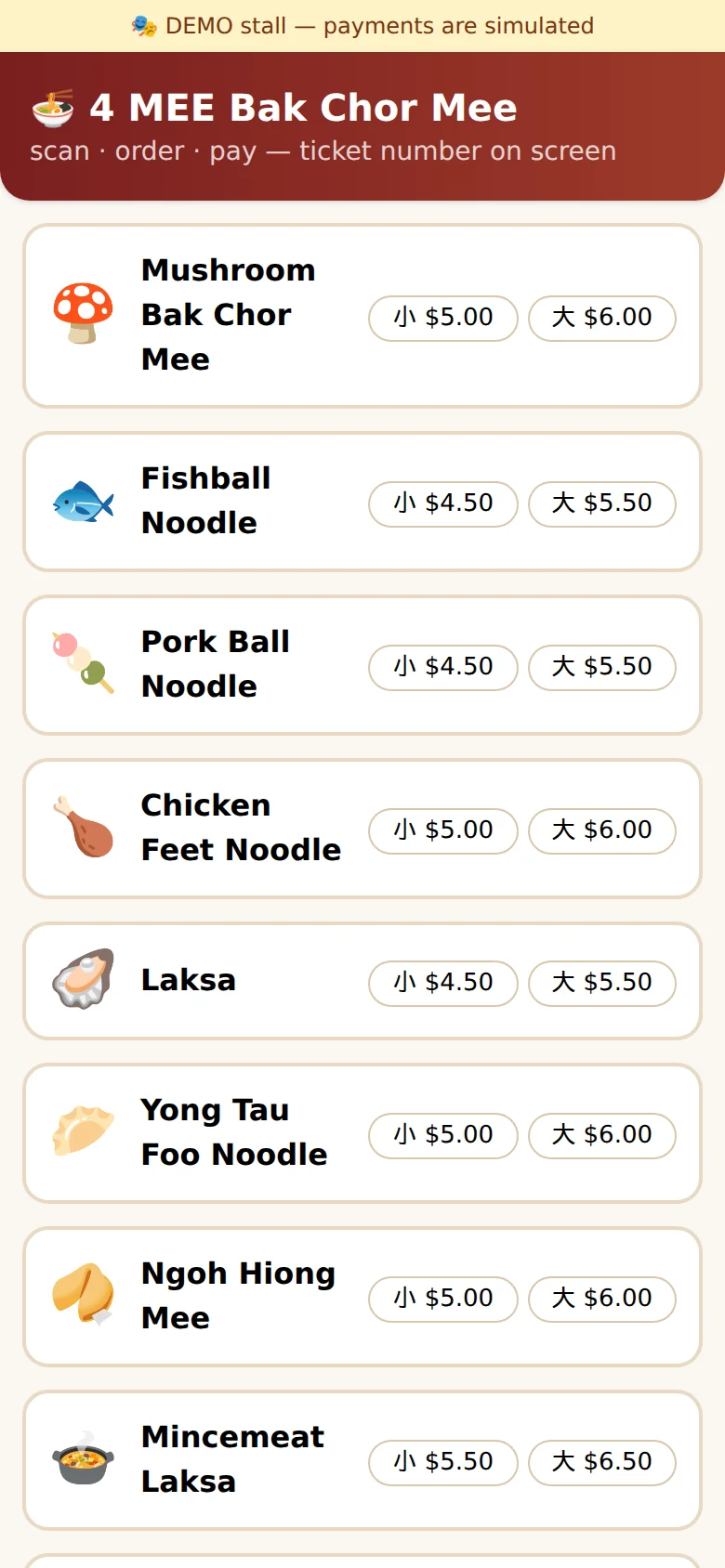
One detail matters more in a hawker centre or coffee shop than anywhere else: no app to download. Customers scan, order and pay in the browser — nobody installs anything to buy a bowl of noodles. And if your regulars read Chinese more comfortably than English, or the other way round, a bilingual menu is part of this layer, not an extra; StallPOS menus and the interface work in English and Chinese.
Payment: the shortest chain that works
For a Singapore food business, PayNow is the backbone: the customer pays from their banking app straight into your bank account — no middleman holds the money, no settlement wait. The flow is strictly step by step: the customer pays; your staff confirm the payment in the app with one tap; only then does the order reach the kitchen display.
Card terminals are a separate product category — rented hardware, monthly fees, a cut of each swipe. They are not part of StallPOS; some businesses add one later for tourists and corporate cards, but plenty of stalls never do.
Kitchen: a screen instead of shouting
Once orders arrive from a counter, a QR code and maybe a delivery channel, shouting across the kitchen stops working. A kitchen display shows the cook what to make, in order, and — on systems that have it — how long each order has been waiting. For a one-person stall, a single tablet on a stand is enough; a busy restaurant with several stations earns a proper display quickly.
S$58/month per stall · setup free · first 30 days of live ordering at S$0 from Go-Live · no commission on PayNow.
Reporting: what to expect on day one
The point of connecting everything is that the day's numbers appear without anyone typing them. For a small stall, that means daily takings, a cash-versus-PayNow breakdown, and the day's order records you can export as CSV for your accountant. That is the reporting that pays for itself in week one; deeper analytics can wait until you have weeks of data to analyse.
Choosing a POS: the checklist that saves you money
Before you sign anything, work through this checklist. It is vendor-neutral — use it to judge any system, including ours.
| What to check | The question to ask | Why it matters |
|---|---|---|
| Setup time | Who builds the first menu, and how long? | You should be selling, not doing data entry |
| Menu changes | Can you change a price yourself, in minutes? | Prices move with ingredient costs |
| Customer friction | Does the customer need an app or account? | Every extra step costs you orders |
| Language | English and Chinese on the same menu? | Your regulars may read either |
| Payment route | Is the money route written down — whose account, which fees? | Verbal promises count for nothing |
| Hardware | Does it run on devices you already own? | Dedicated terminals can cost hundreds to thousands each |
| Demo | Can you watch a real order run end to end? | A brochure proves nothing |
| Exit | Is it month-to-month? What does leaving cost? | Lock-ins outlive the honeymoon |
The first-year cost framework
The sticker price is rarely the real price. When you compare options, add up the first year:
| Cost line | What to ask |
|---|---|
| Hardware | Buy, rent, or use your own phone and tablet? |
| Subscription | Flat monthly, or a percentage of sales? |
| Setup and training | Charged, or included? |
| Payment fees | Whose account holds the money, and who takes a cut? |
| Leaving | Any penalty, notice period, or hardware to return? |
A flat monthly fee you can say out loud — like S$58 per stall — makes this arithmetic easy. A percentage of sales makes it grow with your best month. Work the sums for your own volume before you commit.
Five demo tests before you sign
- One sale, three places. Place a test order and pay for it. Check that the order appears on the kitchen display and in the day's report — without anyone copying anything between screens.
- One edit, everywhere. Change a price. Confirm the QR menu, the cashier screen and the kitchen all see the new price.
- A refund or cancellation. Ask to see how a cancelled order is handled. If the answer is awkward, that is your answer.
- The export. Ask for the sales data as a CSV. If you cannot take your numbers with you, you do not own them.
- Friday at 12:30. Ask who answers when something breaks during the lunch rush — a person, a form, or nothing.
Five common mistakes
- Buying hardware first. Choose the software, then see what it runs on. Terminals bought before the system often end up as doorstops.
- Paying for a year upfront. A system that works earns your renewal monthly; a long prepayment mostly protects the vendor.
- Ignoring the payment route. A cheap subscription with a commission on every order is not cheap.
- Skipping training. A system your staff avoid is a system you paid twice for — once in cash, once in orders gone wrong.
- Judging by a quiet-hour demo. Ask to see several orders arriving together; the lunch rush is the exam, not the showroom.
Stacks by stage
Opening soon, small budget, you are the cook, cashier and cleaner. Keep it to a POS with QR ordering, PayNow direct to your bank account, and a tablet in the kitchen. Skip stock modules and loyalty for now. Get a system that is set up with your menu before opening day, so you are not learning software during the first lunch rush.
A stall with a queue. Add takeaway QR codes in the queue and a sold-out routine — items switch off the moment the last portion sells. Watch the daily report against the till at closing; the two should agree to the dollar.
A full restaurant. Multi-course orders and table service push the stack toward a kitchen display that separates starters from mains; table-management and booking tools are real product categories with their own costs — buy them when the restaurant actually needs them, not before. Those are real product categories with their own costs — buy them when the restaurant actually needs them, not before.
Where StallPOS fits
StallPOS covers the small-business core of the stack: the cashier POS, QR ordering, a kitchen display, menu management, daily takings reporting with the cash-versus-PayNow breakdown and order records, and PayNow straight to your bank account with no StallPOS commission. S$58 per month per stall, setup free, and the first 30 days of live ordering cost S$0 from the day you activate Go-Live. We built it while running our own noodle stall, so the guides come from real counter experience — queues, sold-out dishes and all.
Boss questions
No proprietary hardware is required — StallPOS runs on your own phone or tablet, and the kitchen display is any screen you already own. Card terminals are a separate purchase some businesses make; StallPOS does not include them.
When the first five layers run without your attention. Reservations suit full-service restaurants; stock tools suit high-volume kitchens. Neither is part of StallPOS today.
A POS with QR ordering, PayNow to your own bank account, a tablet as the kitchen display, and daily takings reporting — S$58 a month flat with StallPOS, setup included. Everything else can wait.
Run the retyping test: place one order, pay one real payment, and change one price. If any of those steps needs a person to copy information from one screen to another, you have found the gap.
Step by step: the customer pays by PayNow into your bank account; your staff confirm the payment in the app with one tap; then the order reaches the kitchen display.
Related guides
- Setting up online ordering at your stall
- Restaurant and stall payment processing
- Restaurant and stall menu management