Menu management is the work of keeping one accurate menu — items, prices, modifiers, allergen notes and availability — and making sure every place a customer sees it shows the same thing. This guide covers what to manage, how to control changes, what to check under Singapore labelling rules, and how to set it up on a small budget.
- Keep ONE master menu record — items, prices, modifiers, availability — and make every channel (counter, QR, printed board) read from it.
- Control changes like money: note what changed, where it applies, when it starts, who approved.
- Modifiers are where kitchen mistakes start; name them clearly and carry them to the kitchen display.
- Singapore labelling rules bite mainly on prepacked food and allergen requests — check the SFA guidance before printing.
- Daily sales reporting by item catches pricing and availability mistakes within a day.
Menus rarely fail because one price is wrong. They fail because the menu lives in five places: a board, a till, a chat group, a printout and someone's head. Keep it in one place and every other problem shrinks.
On this page
- What menu management actually covers
- Why it matters more than it looks
- Set one source of truth and a handoff
- Handle every change as a small task
- Features a menu system should have
- Singapore requirements to check
- A low-budget menu workflow for a new stall
- Menus for caterers
- Where StallPOS fits
- Boss questions
- Related guides
- Sources
What menu management actually covers
Most owners think of the menu as a list of dishes and prices. In practice it is a record with many fields, and each can go wrong somewhere.
- Items and categories. What you sell and how it is grouped — noodles, rice, sides, drinks.
- Prices. Including set meals, add-ons, and any difference between dine-in and takeaway.
- Modifiers. No spring onion, extra noodles, less sweet, large portion. These are where most kitchen mistakes start.
- Availability. Sold out, lunch only, weekends only.
- Descriptions and photos. Short, consistent, in the languages your customers read.
- Allergen and dietary notes. Peanuts, shellfish, egg, and any halal or vegetarian status you claim.
- Dates. When a new price or dish starts, so staff are not guessing.
A menu management system holds this record and pushes it to your ordering channels — the cashier POS, the QR menu and the kitchen display. For many stalls and small restaurants, that system is simply the POS itself.
Why it matters more than it looks
The cost of poor menu control is rarely dramatic: a customer scanning a QR code and ordering a dish you ran out of at noon; a price raised at the counter but not on the board; a missed "no peanuts" note. Each one costs a refund, a remake, or a regular who stops coming.
Good menu control helps in three places. Accuracy: modifiers defined once reach the kitchen the same way every time, so there is less guessing at the wok. Speed: fewer questions at the counter and fewer handwritten chits mean the queue moves. Margins: seeing which items sell and which are slow lets you reprice, bundle or drop them on evidence rather than a hunch.
Set one source of truth and a handoff
Software is not the main control; routine is. A named owner for the menu and a clear handoff for every change matter more than which tool you pick.
For a small business this can be simple:
- One owner. At a stall that is usually you; in a restaurant, the chef or manager. Only that person approves changes.
- One master record. Decide where changes are made first: the POS back office, not on a whiteboard or in a chat message to a part-timer.
- One routine. Check the menu before opening, and again after any change.
When the cashier screen, the QR menu and the printed board disagree, the master record wins.
S$58/month per stall · setup free · first 30 days of live ordering at S$0 from Go-Live · no commission on PayNow.
Handle every change as a small task
Treat each menu change — a price, a sold-out item, a new dish — as a small task with a time, an owner and a check that every channel was updated. You do not need software for this; a shared note or form is enough.
Illustrative only — a sample change note:
| Field | Example |
|---|---|
| Change | Fishball noodle, small: S$4.00 → S$4.50 |
| Where it applies | Cashier POS, QR menu, takeaway, printed board |
| Starts | Monday, before opening |
| Approved by | Owner |
| Checked against | POS, QR menu, board, kitchen display |
The last row is the one people skip. Walk through each channel and look — ideally by scanning your own QR code on a phone. A change is complete only when every channel shows it, not just when the POS has been updated.
Features a menu system should have
Whether you are comparing tools or building a routine, these features keep a menu organised and accurate across channels:
- Central editing. One place to change items and prices, with the change showing on every channel.
- Modifiers defined once. Options and add-ons carry set prices and travel with the order to the kitchen display, so the cook sees "no spring onion" the same way every time.
- Quick availability toggle. Mark an item sold out in seconds, from the counter or a phone.
- Multilingual menus. In Singapore, English and Chinese are the baseline for many customers.
- Kitchen display. Orders arrive on a screen in a readable format, in order, instead of a handwritten slip.
- Daily sales reporting. A simple daily view of what sold, so decisions rest on numbers rather than memory.
- Simple payments. Few steps between ordering and paying, with each payment confirmed by a person before the order counts as paid.
- Human support. Someone who can set up your menu with you, not just a help article.
For a hawker stall, be wary of tools that need expensive proprietary hardware or a customer app download — both add friction on both sides of the counter.
Singapore requirements to check
Menu information is also a compliance matter. The Singapore Food Regulations require clear labelling and nutrition information for prepacked food. For dishes cooked and served to order, the Singapore Food Agency states that labelling requirements apply only to prepacked food — but businesses should still give label-type information, such as allergens, on request, and it gives the menu and standees as examples.
Practical steps:
- Add an allergen note field to every item that contains common allergens, and keep it in the master record.
- Make sure your QR menu shows those notes, so customers see them before ordering.
- If you sell prepacked items — bottled sauces, packed snacks — check the SFA page for the labelling rules that apply to you.
- Only claim "halal", "vegetarian" or similar if your certification or process supports it.
A low-budget menu workflow for a new stall
If you are opening soon and watching costs, this is a sensible order of work.
- List what you will actually sell. Start with the core 20 to 40 items. A shorter menu is faster to cook, easier to price and simpler to keep accurate.
- Cost each dish. Add up ingredients per portion against your selling price. Revisit after the first month of real purchases.
- Define modifiers once. Spice level, portion size, add-ons and exclusions, each with a set price.
- Write names in both languages. Keep descriptions short.
- Add allergen notes. Do it now, not after a customer asks.
- Load it into your POS and test it. Place a dummy order of each type — dine-in, QR, takeaway — and check what the kitchen display shows.
- Set a weekly review. Read the daily reports and change one weak item or one price at a time.
On cost, choose a flat monthly price with no commission on payments. Percentage fees on every order take more as you get busier; a flat fee stays predictable.
Menus for caterers
Caterers face a different problem: not one menu but many — a corporate lunch, a wedding and a birthday party need different items, portions and prices.
- Keep a master list and build packages from it, so a price change flows through to every package.
- Record customer requirements per event — allergens, halal needs, vegetarian counts, headcount — on the order, not in your memory.
- Set lead times per item; some dishes need two days' notice, others do not.
- Version your quotes. Note the date a menu and price were quoted.
The same governance applies: one owner, one master, a check before the event.
Where StallPOS fits
A menu tool that skims every sale is a tax on your success. StallPOS takes a flat S$58 a month instead — and the menu work is part of the setup.
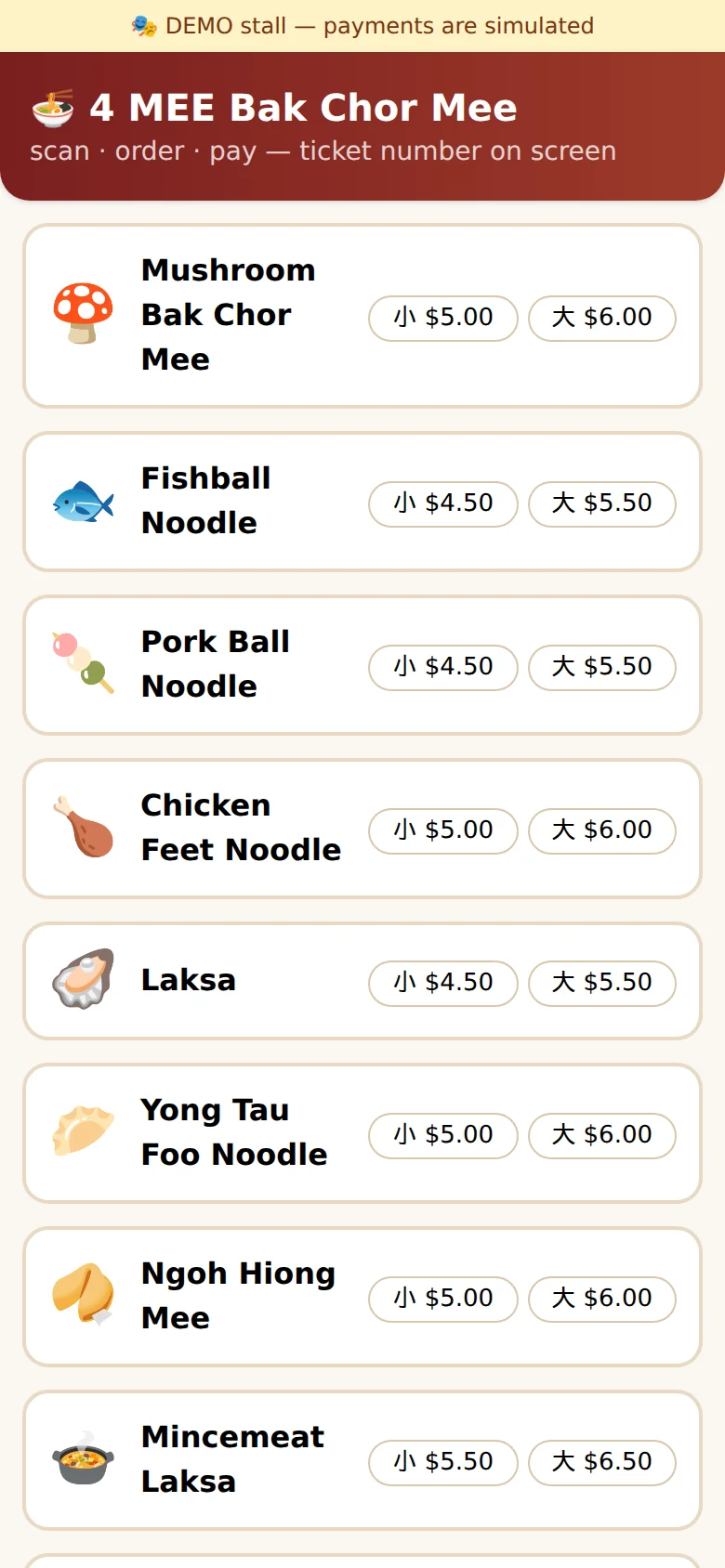
We keep the menu in one place and let the ordering channels read from it. StallPOS covers the cashier POS, QR ordering, a kitchen display for the cooking side, menu management with sold-out toggles, and daily sales reporting. The interface works in English and Chinese, and we set up each shop's menu with the owner personally, because a messy first import creates problems for months.
Payments go straight to your bank account, with a person in the loop: the customer pays by PayNow into your account, your staff sees the payment in the app and confirms it with one tap, and only then does the order count as paid. There is no commission on your orders and no customer app to download. Card / credit-card terminal payments are not part of StallPOS today; PayNow QR is the payment method.
It costs S$58 a month per stall, month to month, with free setup and your first 30 days of live ordering at S$0 — details on the pricing page. Still comparing options? The hawker POS guide and the honest comparison walk through the criteria. Coffee shops and canteens can look at QR table ordering; for the payment side, how PayNow QR ordering works is set out step by step.
Boss questions
Menu management is the upkeep: creating, editing and publishing an accurate menu across channels. Menu engineering is the analysis: using sales and cost data to decide what to promote, reprice or remove. You need the first to do the second reliably.
Usually not, for a single stall or shop. If your POS holds the master menu and feeds the QR menu and the kitchen display, it already is your menu management system. A separate tool starts to make sense when you run many outlets or several delivery platforms.
On the kitchen display. Each order appears on a screen with its items and modifiers in a readable format, instead of a handwritten slip carried across the stall.
Update it whenever prices, ingredients or availability change, and review the daily reports weekly. Each change should be checked on every channel the same day it takes effect.
The SFA says labelling requirements apply to prepacked food only. For non-prepacked dishes, it expects label-type information such as allergens on request, and suggests the menu or a standee as ways to provide it ([SFA](https://www.sfa.gov.sg/regulatory-standards-frameworks-guidelines/food-labelling-packaging-guidelines/labelling-requirements-for-food)). Check the SFA page for your situation.
S$58 a month per stall, month to month, with free setup; your first 30 days of live ordering cost S$0 ([pricing](/pricing)). Customers pay by PayNow straight to your bank account, and your staff confirms each payment in the app with one tap.
Related guides
- Setting up online ordering at your stall
- Restaurant and stall payment processing
- Restaurant and stall menu management